AI image production · available now · included in Pro
Create, edit, and finish campaign images in one AI workspace.
Imager.gg gives you 10 purpose-built tools for image generation, editing, model comparison, reference composition, campaign graphics, mockups, thumbnails, headshots, stock search, and upscaling.
Product video · 1:59
Bring a prompt, one source image, or up to 14 visual references. Choose the tool and model. Imager builds the candidates. You inspect every result, revise the direction, and decide what gets downloaded or reused.
Every successful model in a comparison is billed separately. Generated text, likeness, composition, and usage rights still need your review.
Inside Imager.gg
See Imager.gg in action.
Real screens from the workspace: fix an image with plain words, put one design on product mockups, and generate from a text prompt.
Image-to-Image Edit
Mockups
Text-to-Image
Product facts
The product facts before you begin.
- Status
- Available now
- Membership
- Pro plan
- Start with
- Create from a prompt or reference
- Review
- Shape the result
- What moves forward
- Package it for the campaign
Available exports, publishing destinations, and configured connections depend on the workflow. This page states verified capabilities without promising automatic integration with every platform.
Make the campaign look as considered as the idea
Finish the visual job without rebuilding it across six disconnected tools.
One tab generates the image. Another edits it. A third builds the mockup. A fourth handles the thumbnail. Then the files, prompts, and approved versions scatter across downloads and folders.
How the work moves
From rough direction to an approved campaign visual.
Imager does not hide the decisions that matter. You choose the source, workflow, model, format, and quantity before generation—and you approve the result before it goes anywhere else.
Bring the job
Start with a prompt, source image, product flat, thumbnail, or a set of 2–14 ordered references.
Run the right workflow
Generate, edit, compare models, compose references, render campaign formats, build mockups, or upscale.
See individual results
Each image lands in the gallery with its model, prompt, style, and workflow attached.
Choose what survives
Inspect, favorite, edit, regenerate, download, or hand an approved image to CreatorStudio.
10native visual tools
25campaign presets
32mockup templates
50images in a headshot batch
01 · Ten tools, ten defined jobs
Choose the tool by the asset you need to finish.
Each mode has its own inputs, model choices, controls, and output rules. Text rendering, product packaging, face replacement, and upscaling no longer have to squeeze through the same generic form.
See how it worksText-to-Image
Prompt, enhance, choose a model, style, ratio, quality, and up to four outputs.
GPT Image 2 · Nano Banana · SeeDreamText Art
Typography-first generation with Ideogram V3 and its native visual directions.
64 Ideogram presetsImage-to-Image
State what should change and what must remain.
Single referenceMulti-Image Ref Transfer
Assign a person, product, pose, style, lighting, or setting by reference order.
2–14 referencesImage Upscaler
Rebuild detail, compare the result, and export JPEG or PNG.
Topaz 2× or 4×Stock Images
Search real Pexels photography and keep attributed results beside generated work.
Non-AI sourceMockups
Put one flat design onto selected books, boxes, devices, and bundles.
32 templatesMarketing Presets
Turn a short brief into a layout-specific GPT Image 2 campaign graphic.
25 presetsThumbnail Cloner
Keep a useful composition while replacing the person, face, and detected text.
3-stage workflowStudio + YouTube Headshots
Use three reference photos to create professional portraits and expressive thumbnail poses.
25 + 25 images02 · Stop guessing which model will understand the prompt
Ask four models the same question.
One from Each runs Nano Banana 1-Pro, Nano Banana 2!, SeeDream, and GPT Image 2 against the same text-to-image or editing brief. Judge the actual results instead of rebuilding the prompt four times in four browser tabs.
- Each successful result keeps its underlying model identity
- Choose one model for 1, 2, or 4 outputs when the direction is clear
- Use model-specific quality and aspect-ratio controls
- Keep every result in the same searchable gallery
SHARED PROMPTOrange treehouse above the clouds, editorial campaign image, crisp product lighting
03 · Use references like ingredients
Tell the model where every important visual decision should come from.
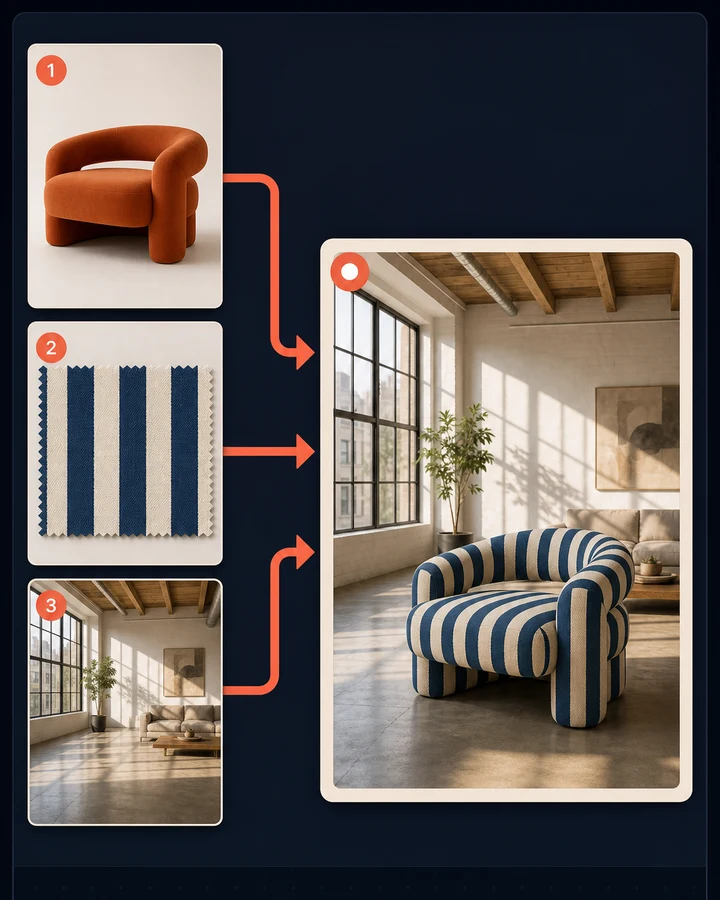
Add from two to fourteen images, then point to them by order: the person from image one, the outfit from image two, the lighting from image three, the environment from image four. Guided examples cover replacements, lighting, style, pose, expression, hair, typography, pattern, background, and in-context composition.
PersonProductStylePoseLightingSetting
04 · From image generation to campaign production
Start with one of 25 campaign formats instead of a blank prompt.
Marketing Presets gives GPT Image 2 the layout, ratio, and production intent before you write the brief. Bring the exact copy, colors, audience, and optional references; then review the final text before publishing.
See how it works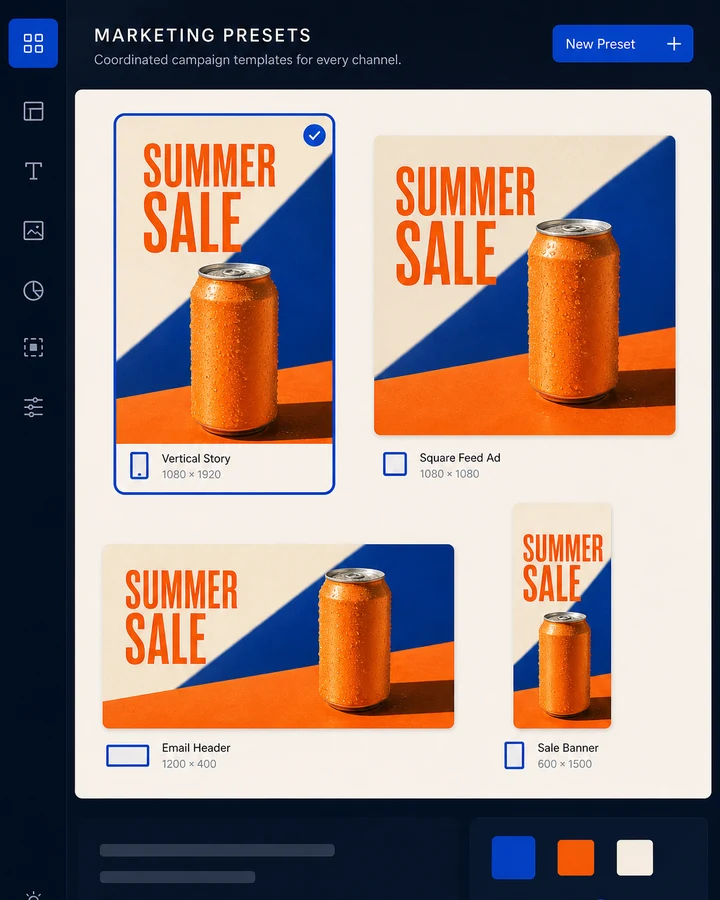
Ads, stories, reels, carousels, quotes, before/after, and pins.
8 presetsHeaders, lead magnets, and welcome illustrations.
3 presetsHeroes, pricing graphics, offer banners, webinars, countdowns, and cart-open assets.
7 presetsBlog, stats, case studies, thumbnails, podcast covers, community banners, and style tiles.
7 presets05 · Finish the asset the channel needs
Turn the keeper into the exact asset the channel needs.
An image can be promising and still not be ready. Package the flat, repair the resolution, rebuild the thumbnail, or create the on-brand human image set before the campaign leaves the workspace.
See how it works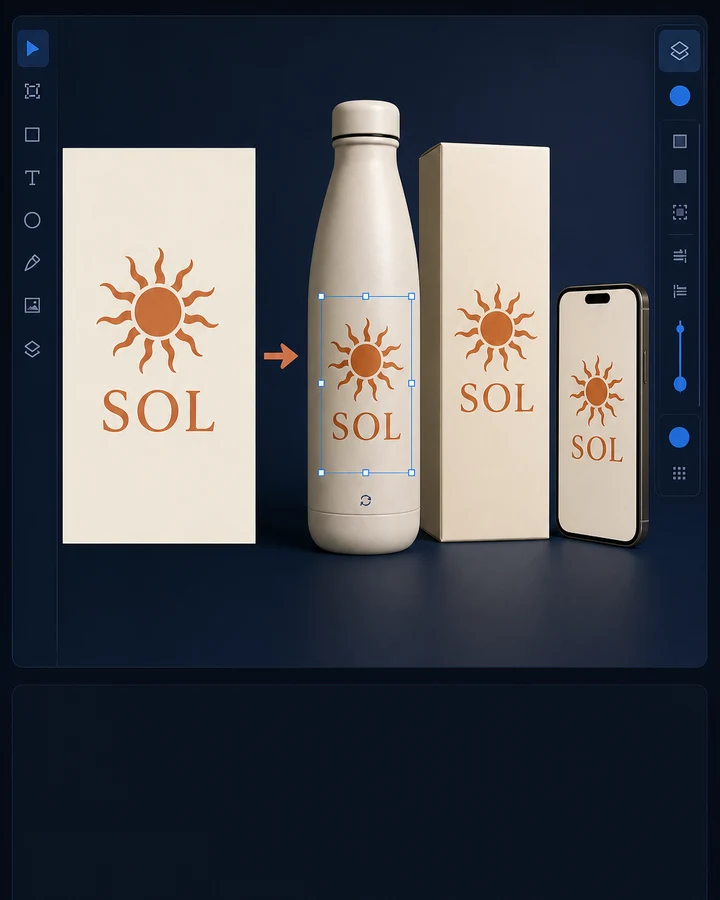
MOCKUPS
One flat. Thirty-two ways to present it.
Choose devices, books, boxes, and bundles; generate a new flat, upload one, or pick from the gallery.

THUMBNAIL CLONER
Keep the structure. Replace what needs to be yours.
Start from a video URL, curated template, or upload; replace the person or face; detect and rewrite the text.
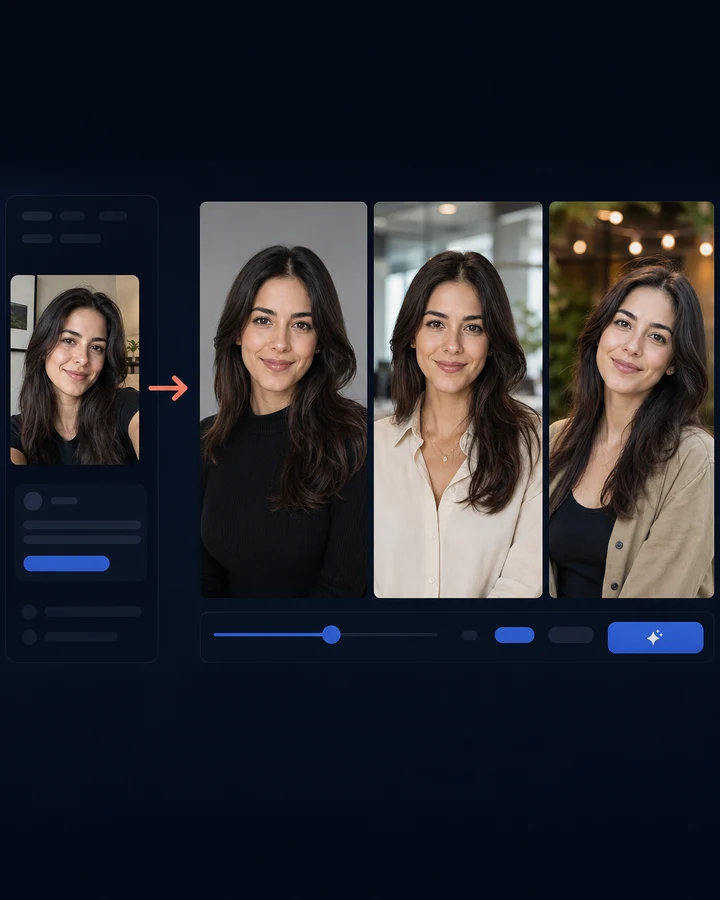
HEADSHOT BATCH
Professional portrait and expressive thumbnail libraries.
Three reference photos become 25 studio portraits and 25 YouTube expressions in one server-side batch.
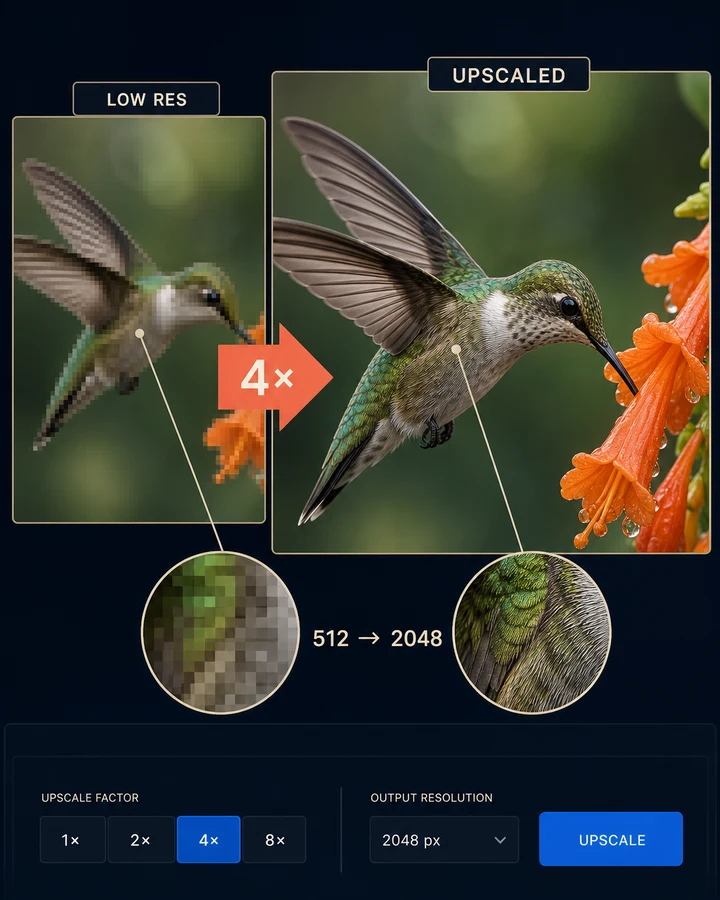
IMAGE UPSCALER
Inspect the detail before you download.
Use a before/after comparison, optional face recovery, 2× or 4× enlargement, and JPEG or PNG output.
06 · Direction without prompt archaeology
Pick from 34 Imager styles or 64 Ideogram presets.
The 34 shared Imager styles cover photographic, illustrative, cinematic, corporate, nostalgic, and fine-art directions. Text Art also exposes 64 native Ideogram presets. Only one style system is active at a time, so the visual instruction stays unambiguous.
See how it worksGenerate. Review. Reuse.
Find the keeper, reopen it, and send it into the next workflow.
Search prompts, group results by date, sort, change image size, filter favorites, open full metadata, and move a keeper back into Image-to-Image Edit. Favorited generations receive extended retention. CreatorStudio assets can appear in the same gallery, and an Imager result can be handed off securely to Video Studio.
My CreationsHeadshotsCreatorStudio
Feature Atlas · Imager.gg
See every Imager.gg feature—and what each one gets you.
Browse every Imager.gg feature, see exactly where it lives in the app, and find the one that moves your business forward today.
Explore the Imager.gg atlas 67 features across 7 areas
Ten focused tools. One visual production desk.
Make the image. Finish the asset. Keep the keeper.
Choose the workflow built for the job, direct the model, and review the result before it becomes part of your campaign.
Recently added
Choose how you pay for every image.
Imager.gg now shares its connection and gallery with CreatorStudio.gg.
Bring your own Fal.ai key
Use your own Fal.ai balance with no monthly fee and wholesale pricing, or keep using built-in credits. Your key is stored securely and never shown again.
Automatic backup attempt
If your Fal.ai account hits a balance, billing, or key problem, built-in credits make one backup attempt so your work keeps moving.
A shared gallery
Images from Imager.gg and CreatorStudio.gg live in one gallery, ready to use in PageBuilder.gg pages.
Straight answers
What to know before you create in Imager.
What is Imager?
Imager is an AI visual-production workspace with 10 focused tools for generating, editing, comparing, packaging, mocking up, and upscaling campaign images.
What can I start with?
Start with a prompt, source image, product flat, thumbnail, or two to fourteen ordered references, depending on the selected tool.
Which creative directions are available?
Imager includes 34 shared styles, 64 Ideogram text-art presets, and 25 campaign-format presets.
Can I compare models?
Yes. One from Each can run the same brief through four supported models so you can judge the results side by side.
Does Imager publish generated images automatically?
No. You inspect, favorite, edit, regenerate, download, or hand off the result you approve.